بحث هذه المدونة الإلكترونية

الخميس، ٣١ يناير ٢٠١٣

GNS3 Error 205-VM R1: unable to add binding for slot 0/0


بسم الله والحمد لله والصلاة والسلام علي رسول الله وآله وصحبه وإخوانه وسلم

GNS3 Error 205-VM R1: unable to add binding for slot 0/0


This error occurs when you try to connect one of your routers to the real network but you do not find any network cards appears in the network adapters list. for example if you run the Network device list.cmd in the GNS3 installation directory you may encounter the following error message:

This is because you many not have the you do not the privileges on the GNS3 folder in the installation directory for example the c drive (C:\).

So to solve this problem do the following:
 For me "gawad" i will give this user the full privileges on the GNS3 installation folder:


 Then run the script again:


ولا تنسوني والمسلمين من صالح الدعاء

وصلي الله وسلم وبارك علي النبي وآله  وصحبه وإخوانه وسلم

الخميس، ١٠ يناير ٢٠١٣

How To Emulate Fiber Optics In GNS3


 بسم الله والحمد لله والصلاة والسلام علي رسول الله وآله وصحبه وإخوانه وسلم

How To Emulate Fiber Optics In GNS3

This post is concerned about how to emulate Fiber Optics on GNS3. But first we need to know some key points.

Synchronous optical network (SONET), a synchronous transmission system defined by ANSI, is an international standard transmission protocol. It adopts optical transmission.
In SDH defined by CCIT (today’s ITU-T), adoption of synchronous multiplexing and flexible mapping allows you to add/drop low-speed tributary signals from SDH signal without large amount of multiplexing/demultiplexing devices. This reduces signal attenuation and device investment.

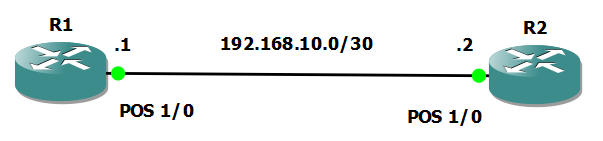
Packet over SONET/SDH (POS) is a technology popular in WAN and MAN. It can support packet data such as IP packets.
POS maps length-variable packets directly to SONET synchronous payloads and uses the SONET physical layer transmission standard. It offers high-speed, reliable, and point-to-point data connectivity.
The POS interface on your device supports PPP, Frame Relay, and HDLC at the data link layer and IP at the network layer. Its transmission rate can vary with devices. For example, in the sequence of STM-1 (155 Mbps), STM-4c (622 Mbps) and STM-16c/STM-16 (2.5 Gbps), the rate of each level is four times that of the immediate lower level.

Configuration:

Note that the fiber optics interface (POS) is available only on Cisco router 7200 series.


Right click the router and choose configure.


This feature is useful for emulating Fiber Channels and other features related to fiber. the only missed feature is that GNS3 does not support capturing packets of fiber ports using wireshark.
I hope that has been informative to you.

ولا تنسوني والمسلمين من صالح الدعاء

وصلي الله وسلم وبارك علي النبي وآله  وصحبه وإخوانه وسلم


الثلاثاء، ٨ يناير ٢٠١٣

How to Emulate Cisco Router External Falsh Memory "ATA PCMCIA Card" in GNS3


بسم الله والحمد لله والصلاة والسلام علي رسول الله وآله وصحبه وإخوانه وسلم


 How to Emulate Cisco Router External Falsh Memory "ATA PCMCIA Card" in GNS3


1-  Right click the router and choose configure.
2- go to the Memories and disks tab as shown in the figure and configure the size of the flash memory.


3- to see the size of the configured flash memory in the router type "show version" in the console screen as shown:

4- the flash memory by default will be slot0 or slot1 or both. formatting this slot will not be possible "really don't know why"
5- but the GNS3 router will consider the flash memory configured previously disk0 or disk1, so we will format disk0 instead of slot0 as shown in the figure.
6- after formatting, dir the disk0 to see it's contents as shown in the figure.
7- you can now copy files like for example IOS or any other files using TFTP server or any method that is compatible.

ولا تنسوني والمسلمين من صالح الدعاء

وصلي الله وسلم وبارك علي النبي وآله  وصحبه وإخوانه وسلم


GNS3 Error Nothing connected to port x, it does not exist


بسم الله والحمد لله والصلاة والسلام علي رسول الله وآله وصحبه وإخوانه وسلم

 GNS3 Error (Nothing connected to port x, it does not exist)


ولا تنسوني والمسلمين من صالح الدعاء

وصلي الله وسلم وبارك علي النبي وآله  وصحبه وإخوانه وسلم

الأحد، ٣٠ ديسمبر ٢٠١٢

How Analog Phone Works


بسم الله والحمد لله والصلاة والسلام علي رسول الله وآله وصحبه وإخوانه وسلم

How Analog Phone Works


Inside a Telephone

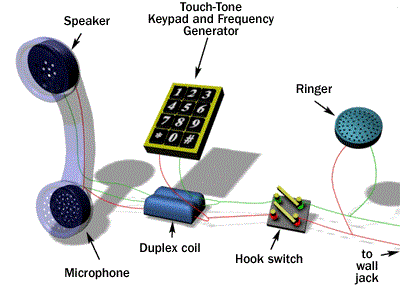
The very simplest working telephone would look like this inside.


As you can see, it only contains three parts and they are all simple:

  • A switch to connect and disconnect the phone from the network - This switch is generally called the hook switch. It connects when you lift the handset. On hook means that the circuit is opened.
  • A speaker - This is generally a little 50-cent, 8-ohm speaker of some sort.
  • A microphone - In the past, telephone microphones have been as simple as carbon granules compressed between two thin metal plates. Sound waves from your voice compress and decompress the granules, changing the resistance of the granules and modulating the current flowing through the microphone.

That's it! You can dial this simple phone by rapidly tapping the hook switch -- all telephone switches still recognize "pulse dialing." If you pick the phone up and rapidly tap the switch hook four times, the phone company's switch will understand that you have dialed a "4."

The only problem with the phone shown above is that when you talk, you will hear your voice through the speaker.


Most people find that annoying, so any "real" phone contains a device called a duplex coil or something functionally equivalent to block the sound of your own voice from reaching your ear. A modern telephone also includes a bell so it can ring and a touch-tone keypad and frequency generator. A "real" phone looks like this.
Still, it's pretty simple. In a modern phone there is an electronic microphone, amplifier and circuit to replace the carbon granules and loading coil. The mechanical bell is often replaced by a speaker and a circuit to generate a pleasant ringing tone.


ولا تنسوني والمسلمين من صالح الدعاء

وصلي الله وسلم وبارك علي النبي وآله  وصحبه وإخوانه وسلم

الأربعاء، ١٢ ديسمبر ٢٠١٢

Microsoft You Are Amazing !!!!!!!!!!!!!!!


بسم الله والحمد لله والصلاة والسلام علي رسول الله وآله وصحبه وإخوانه وسلم

 Microsoft You Are  Amazing !!!!!!!!!!!!!!!


وصلي الله وسلم وبارك علي النبي وآله وصحبه وإخوانه وسلم

الاثنين، ٢٦ نوفمبر ٢٠١٢

How To Configure Capture Image In WDS (Windows Deployment Services)


بسم الله والحمد لله والصلاة والسلام علي رسول الله وآله وصحبه وإخوانه وسلم

How To Configure Capture Image In WDS (Windows Deployment Services)
 

ولا تنسوني والمسلمين من صالح الدعاء

وصلي الله وسلم وبارك علي النبي وآله  وصحبه وإخوانه وسلم

Deploying Windows 7 Using WDS (Windows Deployment Services)


بسم الله والحمد لله والصلاة والسلام علي رسول الله وآله وصحبه وإخوانه وسلم

 Deploying Windows 7 Using WDS (Windows Deployment Services)  


ولا تنسوني والمسلمين من صالح الدعاء

وصلي الله وسلم وبارك علي النبي وآله  وصحبه وإخوانه وسلم

الأحد، ١٨ نوفمبر ٢٠١٢

Reset Domain Services Restore Mode (DSRM) Password


بسم الله والحمد لله والصلاة والسلام علي رسول الله وآله وصحبه وإخوانه وسلم

Reset Domain Services Restore Mode  (DSRM) Password


ولا تنسوني والمسلمين من صالح الدعاء


وصلي الله وسلم وبارك علي النبي وآله  وصحبه وإخوانه وسلم
السبت، ١٧ نوفمبر ٢٠١٢

On the go: Filtering GPOs Application Using WMI Filters


بسم الله والحمد لله والصلاة والسلام علي رسول الله وآله وصحبه وإخوانه وسلم

Filtering GPOs Application Using WMI Filters
 

ولا تنسوني والمسلمين من صالح الدعاء

وصلي الله وسلم وبارك علي النبي وآله  وصحبه وإخوانه وسلم

الجمعة، ١٦ نوفمبر ٢٠١٢

On the go: Installing Software Using GPOs and Using Custom Administrative Templates ".adm"


بسم الله والحمد لله والصلاة والسلام علي رسول الله وآله وصحبه وإخوانه وسلم

Installing Software Using GPOs And Using Custom Administrative Templates ".Adm"


ولا تنسوني والمسلمين من صالح الدعاء

وصلي الله وسلم وبارك علي النبي وآله وصحبه وإخوانه وسلم

الخميس، ١٥ نوفمبر ٢٠١٢

On the go: How To Configure Folder Redirection Using GPOs


بسم الله والحمد لله والصلاة والسلام علي رسول الله وآله وصحبه وإخوانه وسلم


How To Configure  Folder Redirection Using GPOs


ولا تنسوني والمسلمين من صالح الدعاء

وصلي الله وسلم وبارك علي النبي وآله وصحبه وإخوانه وسلم

السبت، ١٠ نوفمبر ٢٠١٢

On the go: Installing the Schema Management Snap-In


بسم الله والحمد لله والصلاة والسلام علي رسول الله وآله وصحبه وإخوانه وسلم

Installing the Schema Management Snap-In


ولا تنسوني والمسلمين من صالح الدعاء

وصلي الله وسلم وبارك علي النبي وآله وصحبه وإخوانه وسلم

الجمعة، ٩ نوفمبر ٢٠١٢

On the go: Adding Additional Domain Controller Using Install From Media "IFM"

بسم الله والحمد لله والصلاة والسلام علي رسول الله وآله وصحبه وإخوانه وسلم

Adding Additional Domain Controller Using Install From Media "IFM"


ولا تنسوني والمسلمين من صالح الدعاء

وصلي الله وسلم وبارك علي النبي وآله وصحبه وإخوانه وسلم

الثلاثاء، ٣٠ أكتوبر ٢٠١٢

on the go: how to stop a scheduled backup task

بسم الله والحمد لله والصلاة والسلام علي رسول الله وآله وصحبه وإخوانه وسلم

how to stop a scheduled backup task


ولا تنسوني والمسلمين من صالح الدعاء

وصلي الله وسلم وبارك علي النبي وآله وصحبه وإخوانه وسلم